Source-included Unity 6 framework

RPG Combat ToolkitComplete turn-based combat framework for Unity 6

Build 2D or 3D tactical combat without recreating the same foundation from project to project. The toolkit combines grid movement and pathfinding, modular abilities and targeting, tactical reactions, inventory and equipment, character rules, working UGUI, editor tools, AI, and combat snapshots in one extensible package.

  • Unity 6.0 LTS minimum
  • 2D and 3D workflows
  • Source code included
  • Demo Menu + 3 combat demos
  • 6 offline PDF guides
  • Official email support
2D & 3D tactical combat Modular abilities and reactions Working UI and editor tools Demos, source, docs, and support

What matters most to buyers

The major capabilities, ordered by practical value.

Technical infrastructure such as actors, services, and turn ownership is included, but the first question is what the framework lets you build and demonstrate.

01

2D and 3D tactical combat foundation

Create square-grid encounters with generation, cells, pathfinding, movement costs, occupancy, facing, range previews, and target feedback in either presentation mode.

  • 2D/3D grids
  • Pathfinding
  • Movement
  • Facing
  • Overlays
02

Modular abilities, targeting, and effects

Build spells and skills from reusable targeting, range, line-of-sight, area, condition, damage/healing, status, projectile, AI, and visual modules.

  • Target filters
  • AoE
  • LOS
  • Conditions
  • Projectiles
03

Tactical actions and reactions

Combine attacks, action-point costs, opportunity attacks, triggered reactions, ready actions, delayed turns, weapon-set swaps, and guarded End Turn behavior.

  • Attacks
  • Action points
  • Reactions
  • Ready
  • Delay
04

Inventory, equipment, and character rules

Use backpack and equipment systems, weapon sets, two-handed safeguards, health, statuses, stat modifiers, dice, and visual NodeGraph formulas.

  • Inventory
  • Equipment
  • Weapon sets
  • Stats
  • NodeGraph
05

Working UGUI and three demonstrations

Test the framework through supplied combat, inventory, initiative, action, ability, status, tooltip, party, combat-log, and turn-control interfaces in three distinct demos.

  • Combat HUD
  • Inventory UI
  • 3 demos
  • 2D example
  • 3D examples
06

Editor tools, source, AI, and snapshots

Set up and validate scenes, author actors and formulas, inspect and extend the source, use default AI paths, and connect supported combat snapshots to your own storage layer.

  • Scene wizard
  • Validator
  • Source code
  • AI
  • Snapshots
Shared contractsInterfaces, data contracts, utilities, input abstraction, stable IDs, and extension seams.
CoreActors, turns, actions, grids, movement, attacks, reactions, health, persistence, and managers.
DefaultsReady-to-use implementations, UGUI, visual presentation, factories, settings, prefabs, and editor helpers.
ExtensionsAbilities, inventory, stats, animation, audio, parties, overlays, AI services, and optional modules.
DemosThree playable combat examples and reusable sample content demonstrating different presentations.
Actual toolkit screenshots

Six concrete views of what is included.

These are not concept mockups. They show the supplied demos and editor tools in the version 1.0 release line.

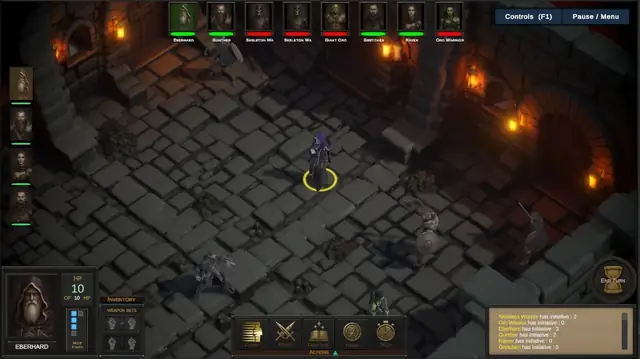
3D dungeon combat demo with party HUD, initiative queue, combat actions, abilities, combat log, and End Turn button
3D dungeon combatA full tactical HUD with party portraits, initiative, selected actor information, action and ability controls, inventory access, combat log, and turn controls.
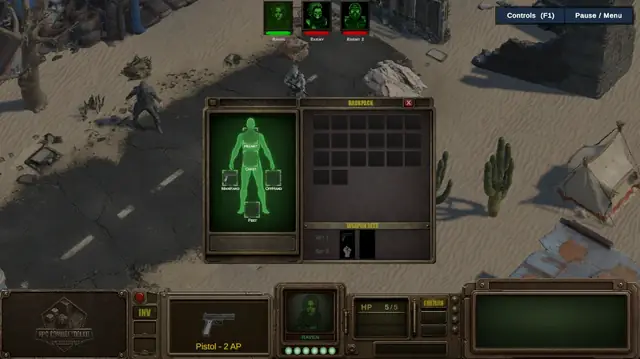
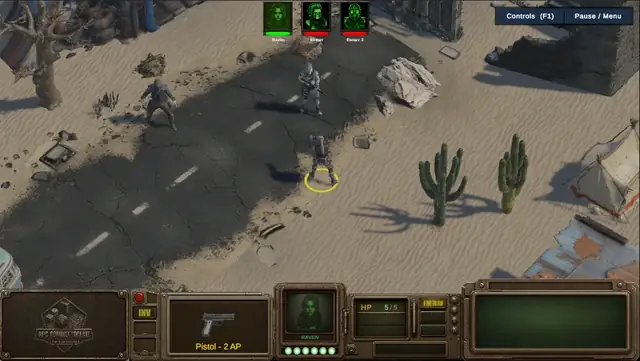
3D desert combat demo with character selection, action points, equipped pistol, End Turn control, and enemy initiative portraits
A second 3D presentationThe same framework supports a different HUD, action-point display, selected weapon, encounter layout, and visual identity.
Inventory and equipment window showing backpack slots, character equipment slots, and weapon sets
Inventory, equipment, and weapon setsBackpack storage, equipment slots, main-hand and off-hand rules, weapon-set assignment, drag-and-drop interaction, and swap support.
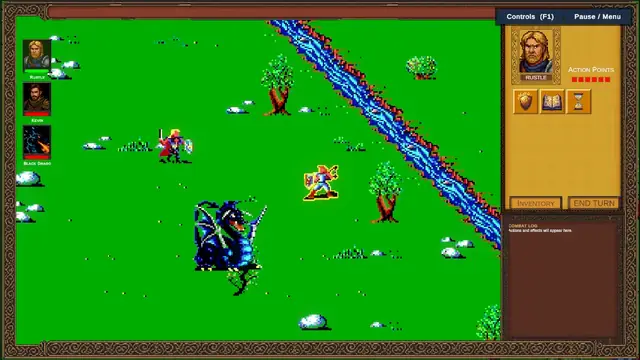
Retro 2D turn-based combat demo with party portraits, action points, actions, inventory, End Turn control, and combat log
2D combat using the same architectureA dedicated 2D demo with its own grid, cursor, actor visuals, user interface, action points, combat log, and presentation style.
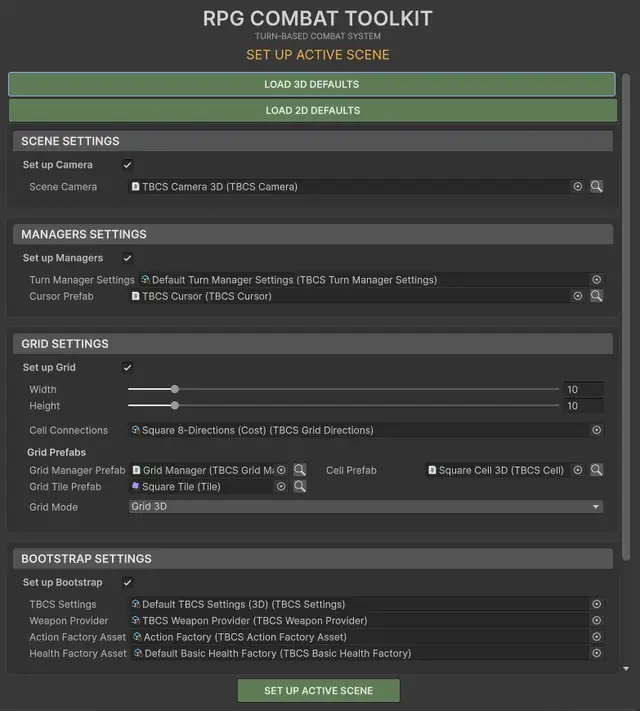
RPG Combat Toolkit Set Up Active Scene wizard with 2D and 3D defaults, camera, managers, grid, and bootstrap settings
Scene setup wizardLoad the supplied 2D or 3D defaults, choose the camera, managers, grid dimensions and prefabs, bootstrap settings, providers, and factories, then create the selected scene infrastructure.
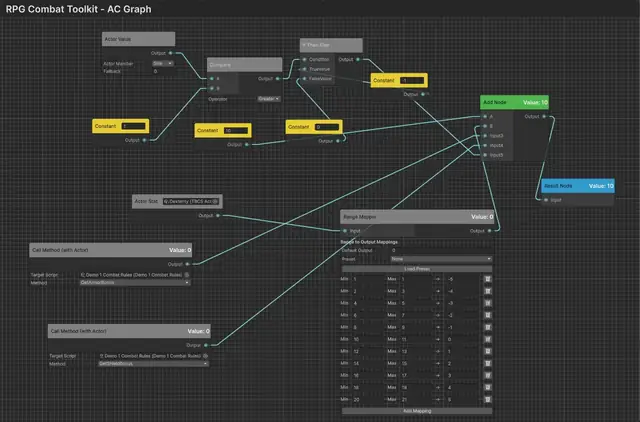
RPG Combat Toolkit NodeGraph formula combining actor values, actor stats, constants, comparisons, conditional logic, range mapping, actor methods, and a result node
Visual stat and rule formulasBuild formulas from actor values and stats, constants, comparisons, conditional branches, range mappings, arithmetic nodes, and actor-method calls.

Concrete use cases

What can you build with it?

The framework supplies the common combat machinery while leaving the game-specific rules, content, and art direction under your control.

A

Create a targeted spell or skill

Define who can be targeted, range, line-of-sight requirements, single-target or area-of-effect shape, validation conditions, health or effect changes, projectile behavior, and visuals. The player preview, final validation, reaction flow, and AI use the same runtime rules.

  • Self, friendly, hostile, or filtered targets
  • Range and line-of-sight checks
  • Area-of-effect zones and previews
  • Effects, statuses, healing, damage, and projectiles
  • 2D and 3D visualizers
B

Build a turn with movement, attacks, reactions, and delays

The turn manager owns the current actor and action queue. Actions can spend action points, movement follows pathfinding and occupancy rules, opportunity attacks and triggered reactions can interrupt the flow, and actors can delay or ready an action.

  • Rounds, current actor, and AI turns
  • Queued actions with availability and cost checks
  • Delay Turn, End Turn, reactions, and ready actions
  • Movement and attack range previews
  • Combat-log and UI feedback for denied actions
C

Equip items and swap weapon sets during combat

Actors can use backpack, equipment, and weapon-set components. The default UI supports drag-and-drop transfers, equipment restrictions, two-handed weapon safeguards, and runtime weapon-set swapping through a combat action.

  • Backpack and equipment slots
  • Main-hand, off-hand, armour, and custom equipment concepts
  • Two-handed and off-hand validation
  • Multiple weapon sets and Swap Weapon Set action
  • Inventory/equipment snapshot adapters
D

Capture and restore supported combat state

The snapshot layer collects registered subsystem chunks for actors, grid objects, health, action points, effects, inventory, equipment, parties, and current combat progression. Connect the resulting snapshot to the storage solution used by your game.

  • Stable IDs and versioned snapshot chunks
  • Pluggable sources and restore adapters
  • Stock adapters for principal combat subsystems
  • Validation before destructive inventory restore
  • No file IO, save slots, or global rollback transaction

Feature catalogue

Start with the capabilities customers evaluate first.

The complete matrix remains available for technical due diligence, but the categories below are deliberately ordered by buyer value rather than internal architecture.

1. 2D/3D grids, pathfinding, and movementGeneration, cells, costs, occupancy, BFS/Dijkstra, facing, paths, ranges, and overlays. 2. Modular abilities, targeting, and effectsTargets, range, LOS, AoE, conditions, damage/healing, statuses, projectiles, AI, and visualizers. 3. Tactical attacks and reactionsMelee/ranged targeting, opportunity attacks, triggered reactions, threat zones, ready actions, and cancellation. 4. Inventory, equipment, and weapon setsBackpack, slots, two-handed rules, drag-and-drop UI, weapon switching, catalogs, and persistence. 5. Character stats, NodeGraph, and diceBase and derived values, modifiers, comparisons, conditional graphs, range mappings, actor methods, and dice. 6. Working combat and inventory UGUIHUD, actions, abilities, party, statuses, action points, combat log, inventory, tooltips, and focus handling. 7. Scene setup, validation, and authoring toolsScene and actor setup, grid generation, validator, tooltip installer, demo setup, spawner guidance, and NodeGraph. 8. Turn economy and action executionRounds, current actor, queues, availability rules, AP costs, delay, ready, End Turn, and weapon-set swaps. 9. Visuals, animation, audio, and cameraOverlays, highlights, health bars, projectiles, animation drivers, voices, footsteps, SFX, and camera helpers. 10. AI and actor behavioursAI turns, movement, attacks, ability evaluation, status-aware denial, and replaceable behaviour interfaces. 11. Combat snapshot and restore adaptersStable IDs, versioned chunks, sources/restorers, stock subsystem adapters, validation, and documented limits. 12. Actor architecture and extension seamsActor components, states, factions, selection, facing, spawning, occupancy, services, providers, factories, and adapters. 13. Demos, docs, source, and supportThree demos, Demo Menu, source code, six PDFs, README, known issues, notices, and email support.

Included demonstrations

Three combat demos, three different presentations.

The demos are examples and learning material—not runtime dependencies of the framework architecture.

Dungeon combat demonstration
Demo 1 · 3D

Dungeon party combat

A party-oriented fantasy presentation showing actors, attacks, abilities, ready/delay controls, inventory access, combat log, voice/audio, and camera helpers.

Desert combat demonstration
Demo 2 · 3D

Desert action-point combat

A contrasting 3D presentation centred on action points, weapons, character selection, enemies, inventory, equipment, and a different HUD composition.

Retro two-dimensional combat demonstration
Demo 3 · 2D

Retro 2D combat

A pixel-art example demonstrating that the same combat architecture can drive a dedicated 2D grid, actor visuals, selection, UI, action points, inventory, and combat log.

Editor tooling

Customer setup is part of the product.

The toolkit does not expect customers to discover every required object and service by trial and error. Version 1.0 includes guided setup and read-only diagnostics.

  • Scene Setup Wizard: load 2D/3D defaults and configure camera, managers, grid, cursor, bootstrap, providers, factories, and previews.
  • Current Scene Validator: reports missing/duplicate managers, actors, factions, Input System setup, EventSystem modules, TMP resources, URP, and tooltip configuration.
  • Actor and grid tools: actor creation, grid generation, grid editor utilities, safer spawner inspector guidance, and undo-aware operations.
  • Tooltip and demo setup: one-click default tooltip installation, demo Build Settings setup, and conflict-safe layer preparation.
  • NodeGraph editor: visually author stat and rule formulas from data, comparisons, conditions, mappings, arithmetic, and actor methods.
Scene Setup Wizard
Set Up Active Scene
NodeGraph formula editor
NodeGraph formula authoring

Requirements and scope

Know the integration requirements before purchase.

Unity editorUnity 6.0 LTS minimum. The release matrix targets Unity 6000.0, 6000.3, and 6000.5. Unity 2022.x and Unity 6.6+ are not claimed by version 1.0.
InputUnity Input System required; Active Input Handling must use the new Input System.
Runtime UIDefault presentation modules use UGUI and TextMesh Pro.
Render pipelineSupplied demos and presentation assets are authored for URP. Built-in RP and HDRP presentation assets are not supplied.
PersistenceCombat snapshot layer only. Your game supplies file IO, save slots, campaign management, and any required global transaction/rollback coordinator.
MultiplayerNetworking and multiplayer synchronization are not included.
Custom integrationsThe architecture exposes extension points, but bespoke third-party integrations and project-specific rules still require implementation.

Documentation

Six offline PDF guides ship with the package.

  • Quick StartDependencies, demos, and first setup.
  • User ManualSystems, architecture, and configuration.
  • CookbookPractical workflows and examples.
  • FAQCommon product and integration questions.
  • TroubleshootingSetup problems and diagnostic guidance.
  • AppendicesReference information and supporting detail.

Technical support

A defined official support route.

Email support includes a two-business-day response target, a structured report checklist, troubleshooting steps, compatibility scope, and a clear boundary between product support and bespoke development.

RPG Combat Toolkit · Version 1.0 available now

RPG Combat Toolkit is now available on the Unity Asset Store.

Get the complete source-included Unity 6 combat framework, or try the public demo first and inspect the full feature list before purchasing.